 TrackerFinder
How TrackerFinder works
Bluetooth trackers like AirTags, SmartTags and Tiles send out a short signal every few seconds. TrackerFinder listens for those signals and keeps track of which trackers keep turning up where you go.
Two ways it checks
Scan now
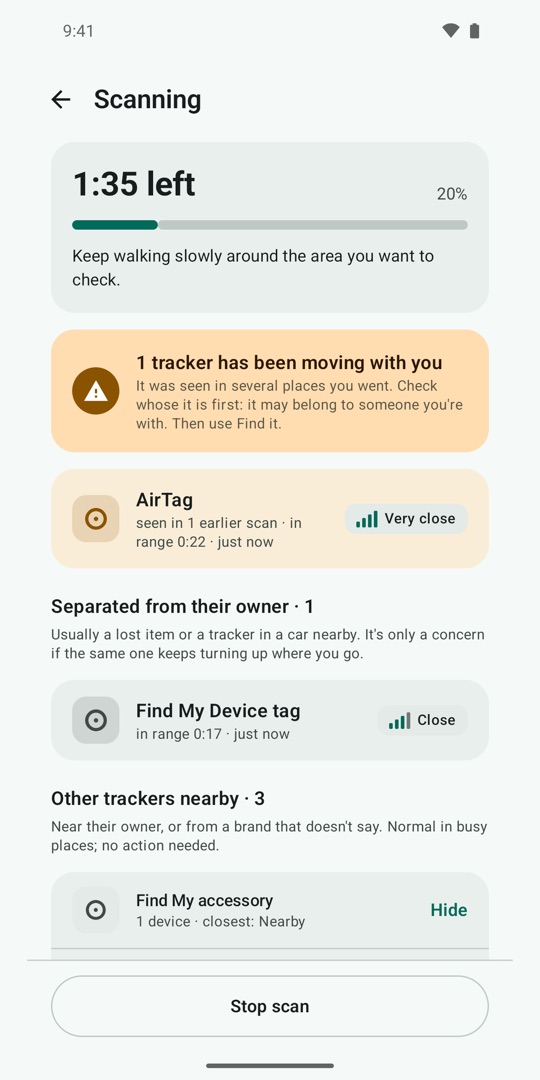
Tap Scan for trackers and walk slowly around what you want to check, such as your car, your bag or a room. The scan runs for 2 minutes (change it in Settings) and lists trackers as it finds them, closest first. Keep the app open: leaving it ends the scan, and what was found is saved.
Background protection
While it's on, TrackerFinder checks by itself, even when the app is closed: about every 15 minutes, and again each time you've moved about 120 m (400 ft). Each check listens for 30 seconds and is saved to History. You don't need to do anything.
What the results mean
Away from owner
Most trackers tell nearby phones whether their owner is close. One that's away from its owner and near you is listed first. On its own that's common, such as a bag left in a car next to you; what matters is whether it keeps turning up.
Other trackers and devices
Trackers near their owner, such as the keys of someone sitting next to you, are listed but never saved and never raise an alert. Some brands don't say where their owner is; those are listed here and still watched. Headphones, watches and other Bluetooth devices are hidden at the bottom and not saved, unless you turn on Watch other Bluetooth devices in Settings.
How it decides a tracker is following you
Places, not single sightings
You pass many trackers every day, so one sighting means little. You get an alert when the same tracker, away from its owner, is seen in several different places at least 400 m (¼ mile) apart, over a minimum length of time. How many places, and how long, depends on the sensitivity you choose in Settings:
| Sensitivity | When you're alerted |
|---|---|
| Low | Seen in 4 places over at least an hour. Fewest false alarms. |
| Balanced (default) | Seen in 3 places over at least 30 minutes. |
| High | A calm heads-up when it's seen in 2 places over at least 15 minutes, then an alert at 3 places over 30 minutes, like Balanced. |
Within one day out
All of it has to happen within 8 hours, such as one trip or one day out. Passing the same lost tag in different places on different days doesn't add up to an alert.
Recognizing the same tracker
To protect their owners, trackers change their Bluetooth address from time to time. Most keep it for a day while away from their owner, which is long enough to recognize one that travels with you. Near its owner, an Apple device changes every 15 minutes, which is why those aren't saved.
Alerts and your own trackers
When you get an alert
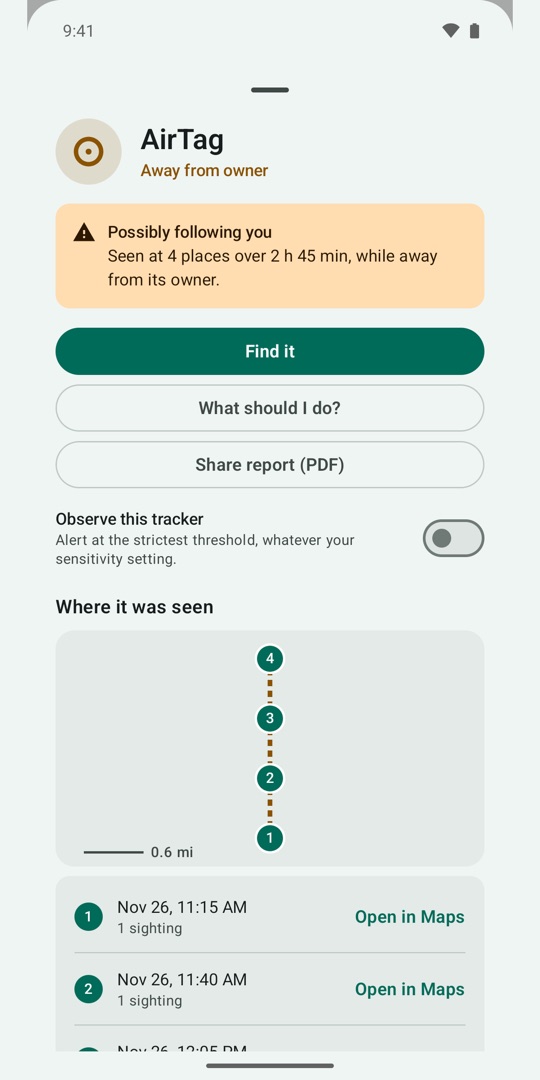
Open it to see where and when the tracker was seen, with a sketch of its route. Use Find to walk toward it with the hot/cold meter, or play a sound on brands that allow it. What should I do? has steps for each brand (also here on the website), and you can share a PDF report.
Mark as safe
Your own trackers, or your family's, travel with you too. Tap one in the scan results or in History and choose Mark as safe, and it will never raise an alert. Undo it in Settings, under Safe trackers.
Observe
Not sure about a tracker? Open it in History and turn on Observe. It then alerts at the strictest level, after 2 places, whatever your sensitivity.
Getting the most out of it
Keep these on
Bluetooth, location (allowed all the time) and notifications. Also let the app run without battery restrictions, or Android may delay background checks. The card at the top of the main screen shows anything that's missing, with a button to fix it.
Your data
Your scan history is stored on your phone, encrypted, with no account. By default it's kept for 7 days, then deleted; trackers marked safe are kept. Read the privacy policy →
What it can't find
Bluetooth apps can't hear GPS trackers that report only over mobile data, anything switched off or with a flat battery, or earbuds inside a closed case. A result of "no trackers" doesn't guarantee that none are present.